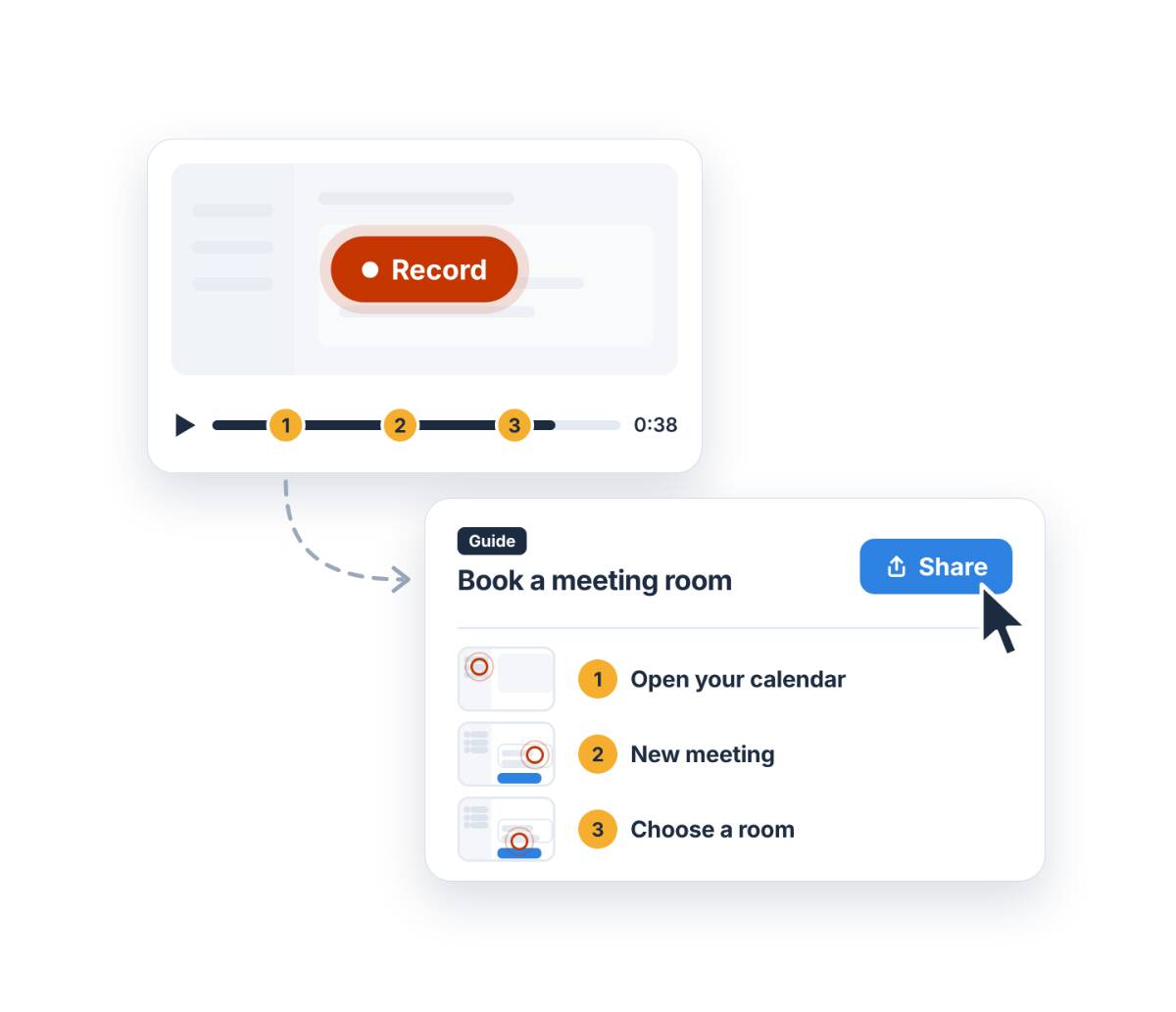
Create an interactive guide your colleagues can click through themselves

No videos to pause. No PDF that disappears into the archives. With the Guide Editor, colleagues can click through each step in the actual app, at their own pace. You create the guide in just a few minutes, and it is available in Teams straight away.

Included for all WorkplaceBuddy customers.

Start with WorkplaceBuddy

“Can you take a quick look?”

It is already the tenth time this month. “How do I share a file with someone outside the organisation?” “Where do I request leave?” “How do I record a meeting in Teams?”

There is a guide somewhere. But it is buried on SharePoint, as version 3. So, everyone just asks IT instead.

Traditional guides do not work:

  • They disappear into archives. Created once, emailed once, and never found again.
  • No one knows which version is right. The app changes, but the document does not change.
  • IT becomes a human help desk. Explaining the same things over and over again.
  • Creating them takes too much time. Screenshots, arrows, and formatting. So, no one does it.

Do not just watch. Do it yourself.

With the Guide Editor, you can create an interactive guide for any process, in any app. Your colleague clicks exactly where they would need to click in real life. They only move on to the next step after clicking in the right place.

That way, they learn by doing it themselves. And what you do yourself, you remember.

Record what you want to explain

Click ‘Start screen recording’ and go through the process as you normally would. Every action is captured.

Play it back and click at each step

Reached an important moment in your recording? Click ‘Create guide step’. You will see your steps appear on the left.

Your entire process at a glance

Each step gets its own screen. Give it a clear title and copy, edit or delete whatever you like.

Show where to click

Draw a rectangle around a button or field and choose a colour. Turn on ‘Go to the next step on click’ to turn your screenshot into an interactive step.

Add a tip

Use a text box to add a short instruction directly on screen. Perfect for filters or options that might otherwise be easy to miss.

Share it with your colleagues right away

Save your guide in the WorkplaceBuddy environment in Teams, where all your guides are kept in one place. Share the link with your colleagues, and you’re done.

Why an interactive guide works better

  • Learn at your own pace. No pausing, no rewinding. The instructions are there when you need them.
  • Always up to date. When you update the guide, everyone sees the latest version right away.
  • Everything in one place. All your guides are available in Teams, right where your colleagues already work.
  • Practice safely. You click through the guide, not in the live environment. So it’s perfectly fine to make mistakes.
  • Never miss a step. Every step requires a click. No more half-knowledge.
  • Created in minutes. No video editing, formatting or technical knowledge needed.

For everyone with knowledge to share. And everyone looking for answers

IT: finally, a central place for IT information

Explain it once, then share the link. Fewer repeat questions, more time for work that really matters

HR and operations: processes that explain themselves

Onboarding, requesting leave, submitting expenses or logging hours. Clear step-by-step guides help colleagues become independent faster.

Colleagues: easily share your own digital tips

Know a handy Excel trick or a useful Outlook setting? Turn it into an interactive guide in just a few minutes and share your knowledge across the organization.

The organization: knowledge that stays

Capture valuable knowledge and ways of working, so they don’t disapear when someone leaves.

What will you create first?

  • Microsoft 365: booking rooms, using shared calendars, creating a Team, sharing files, recording meetings in Teams or saving prompts in Copilot.
  • Your own systems: your electronic patient record (EPR), case management system, CRM or HR portal
  • Internal processes: onboarding, requesting leave, submitting expenses or booking a room
  • Security: rules for sharing with external parties, reporting incidents or sensitivity labels

Tip: start with the question IT gets asked most often.

Get started with WorkplaceBuddy

The Guide Editor is included with every WorkplaceBuddy licence. Get started today and have your first interactive guide in Teams in no time.

Start with WorkplaceBuddy Plan a demo

Frequently asked questions

  • How much does the Guide Editor cost?
    Nothing extra. The Guide Editor is included as standard for all WorkplaceBuddy customers.

  • Who can create an interactive guide?
    Anyone with acess to WorkplaceBuddy in Teams, from administrators and IT to HR and other colleagues.

  • Which apps does it work with?
    Any app or tool you can take a screenshot of. That includes your own systems, tools, and internal processes.

  • How is it different from an instructional video?
    You watch a video; you work through an interactive guide yourself. You set your own pace and click through each step. No pausing or rewinding needed.

  • How do I keep my guides up to date?
    Update the guide in the Guide Editor, and everyone sees the latest version straight away. No more old copies floating around.